
Getting Started
Welcome to the Maraboo API documentation! This guide will help you get started with integrating the Maraboo API into your application.
Prerequisites
Before you begin, ensure you have:
- A Maraboo account
- Access to the Maraboo portal
- Basic knowledge of RESTful APIs
Quick Start Guide
1. Sign Up and Access Your Account
To get started with Maraboo, you'll need to create a business account through our Business Portal.
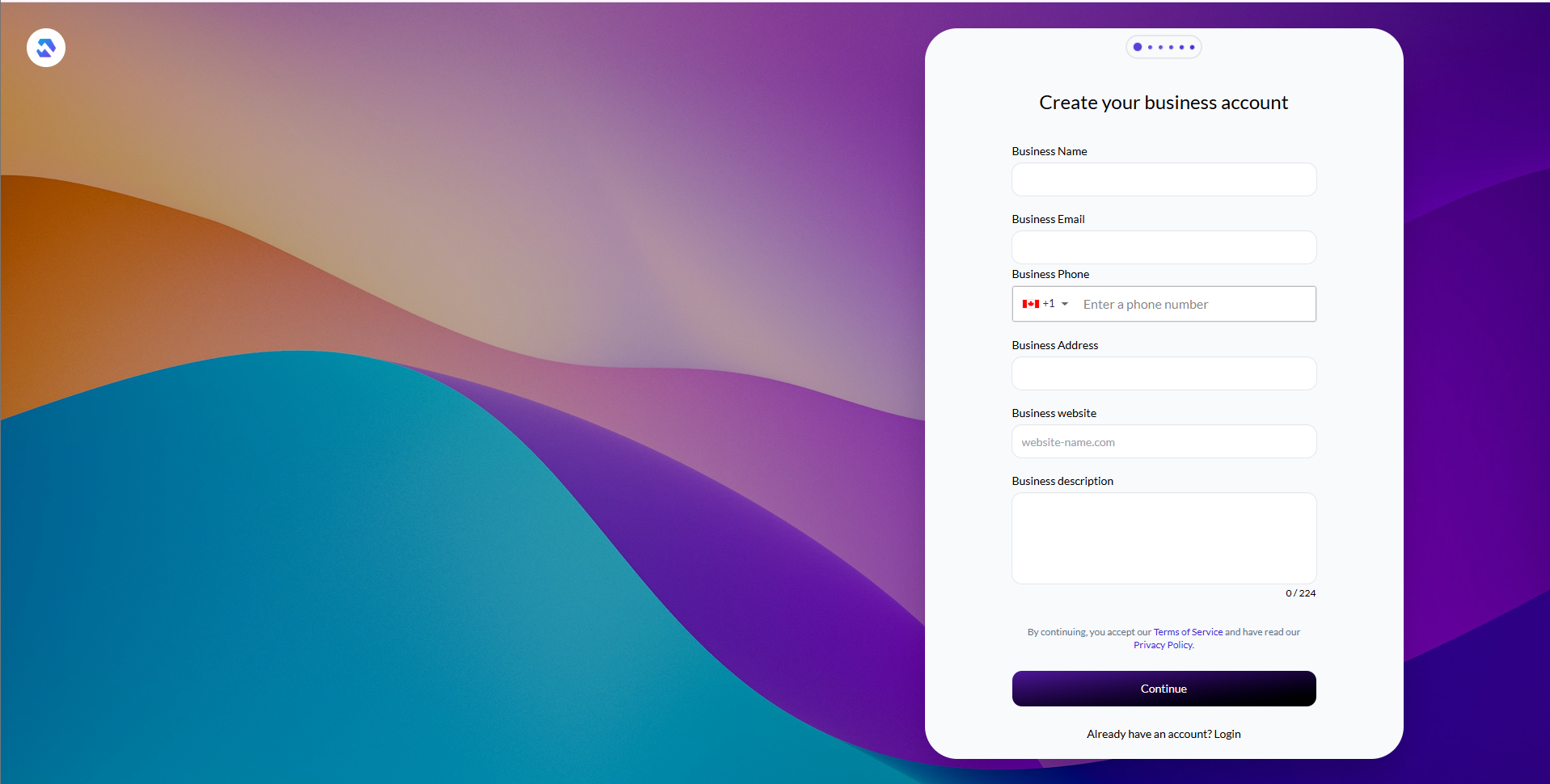
Account Creation Steps:
- Navigate to the Maraboo Business Portal
- Click on "Sign Up" or "Create Account"
- Complete the business registration form with the following information:
- Business Name - Your registered company name
- Business Email - Official business email address (you'll be logged in as Admin with this email)
- Business Phone - Contact phone number
- Business Address - Physical business address
- Business Website - Your company website
- Business Description - Brief description of your business
- Password - Create a secure password for your account
- Accept the Terms of Service and Privacy Policy
- Click "Continue" to submit your registration
After successful registration, you'll be automatically logged in as an Admin user for your business account.
KYB Verification Required
To ensure compliance and security, Maraboo requires a Know Your Business (KYB) verification process. The verification consists of three steps with different access levels:
Step 1: Contact Verifications ✓ Required for Portal Access
- Verify your business email address
- Verify your business phone number
- Access Level: Browse portal and view features (no transactions)
Step 2: Document Verification ✓ Required for Transactions
- Upload required business documents
- Complete business identity verification
- Access Level: Make transactions on the portal
Step 3: API Access ✓ Required for API Integration
- Submit a service request for API access
- Provide IP addresses to whitelist [PROVIDE: Your server IPs]
- Once approved, you'll be able to utilize our API
- Access Level: Programmatic access via API
Access Progression
You can use the portal to explore features after completing Step 1 (Contact Verifications), but you'll need Step 2 (Document Verification) to process transactions. API access requires completing all three steps.
2. Environment Overview
Maraboo provides two environments for development and production use:
| Environment | Base URL | Portal | Purpose |
|---|---|---|---|
| Sandbox | https://sandbox-gateway.mara.boo | sandbox-business.mara.boo | Testing and development |
| Production | https://gateway.mara.boo | business.mara.boo | Live transactions |
TIP
Always test your integration in the Sandbox environment before moving to Production. Use the same Business Portal to manage both environments.
3. Get Your API Credentials
After completing the KYB verification process and receiving approval for API access (Step 3), you can access your API credentials through the Business Portal.
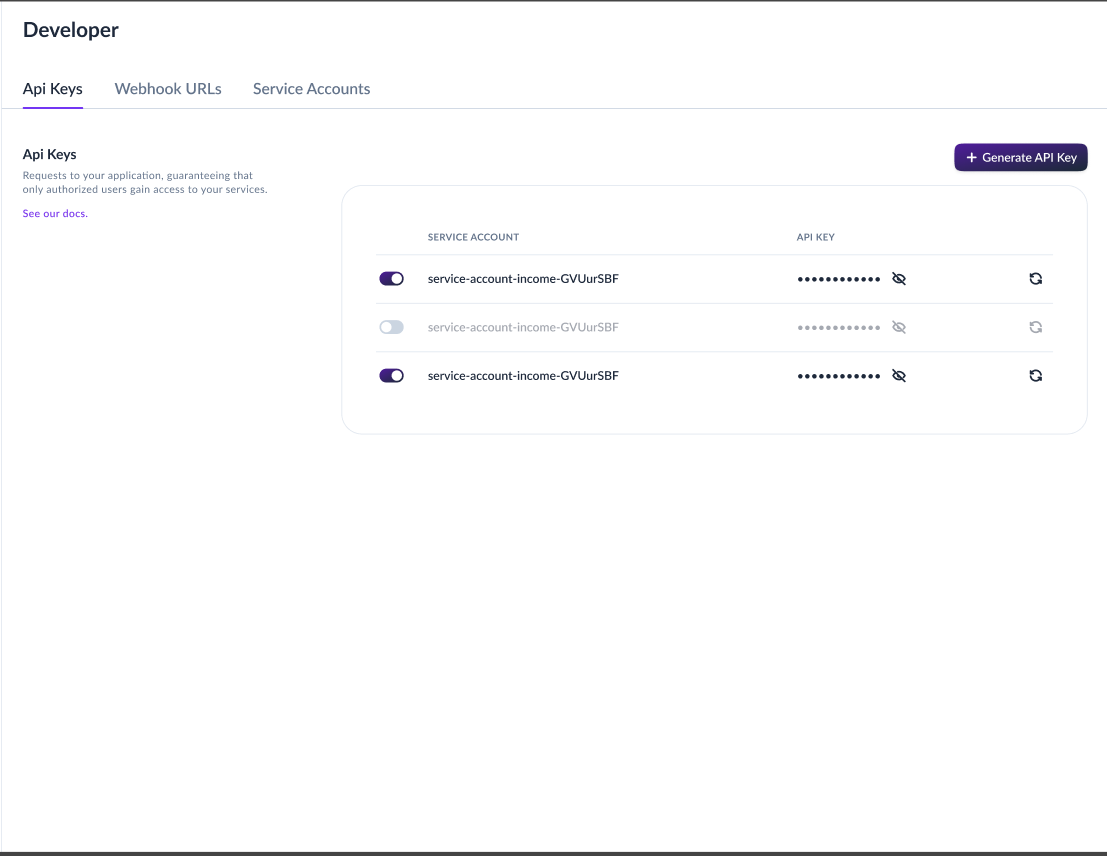
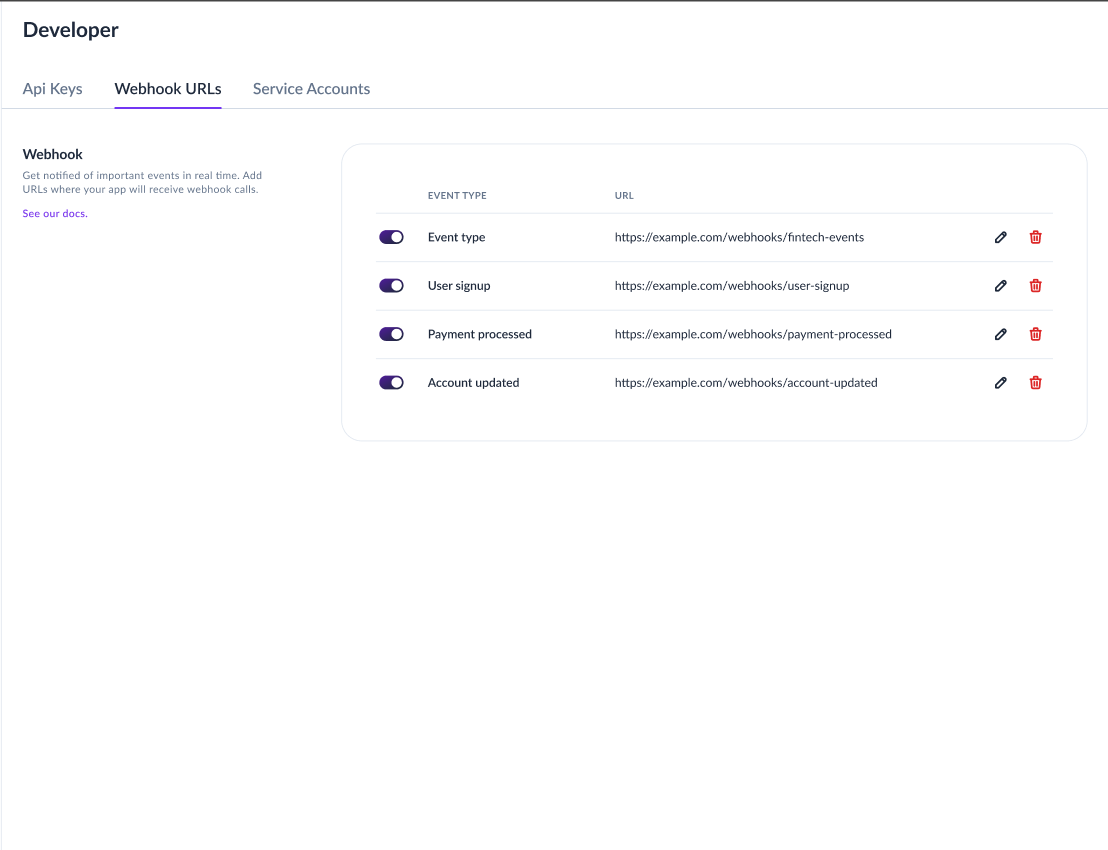
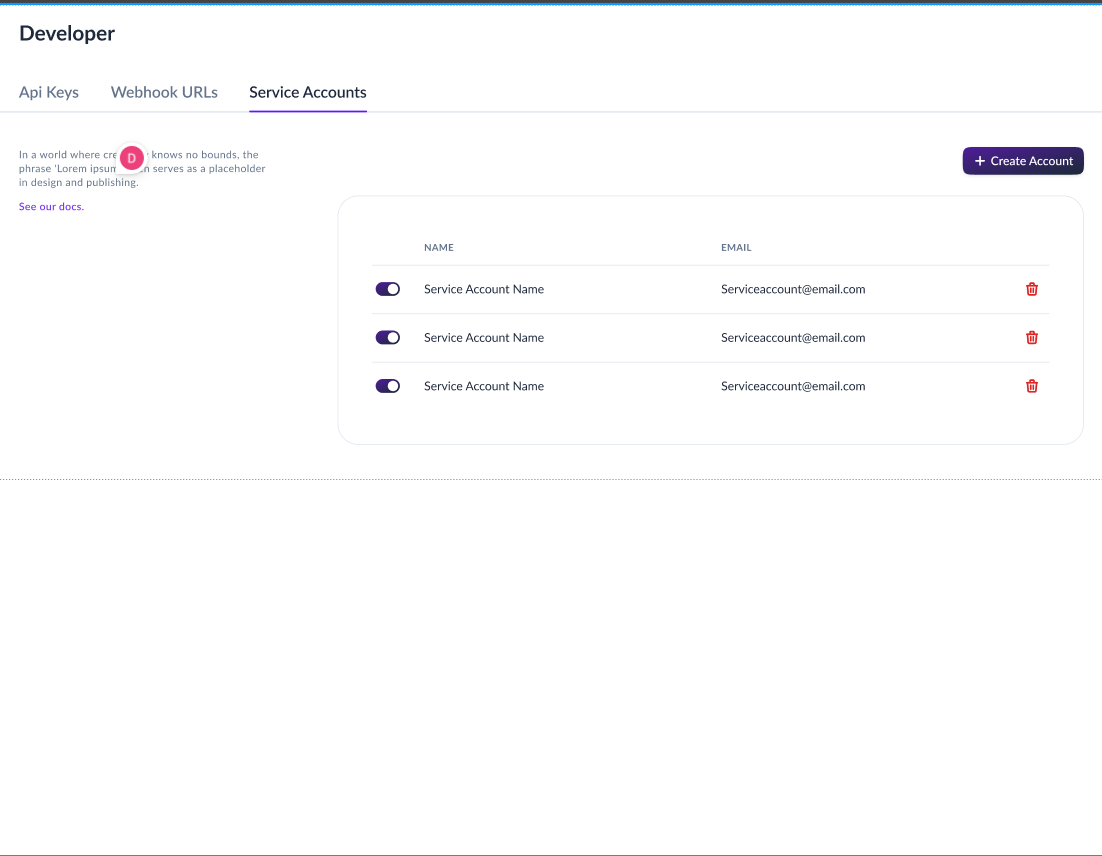
Access Your API Credentials:
The Developers section in the Business Portal provides three key areas:
API Keys - business.mara.boo/developers/api-keys
- Generate and manage your API keys
- View, regenerate, and revoke keys
- Copy keys for use in your applications
Webhooks - business.mara.boo/developers/webhooks
- Configure webhook endpoints
- Manage webhook events and subscriptions
- Test webhook deliveries
Service Accounts - business.mara.boo/developers/service-accounts
- Create service accounts for programmatic access
- Manage service account permissions
- Generate service account credentials
INFO
For detailed instructions on managing API keys and authentication, see the API Keys and Authentication guides.
4. Make Your First API Call
Here's a simple example to verify your setup by fetching your wallets:
Required Headers
All API requests must include:
- Authorization:
HMAC-SHA256 YOUR_PUBLIC_KEY:YOUR_PRIVATE_KEY - X-Origin:
third-party-api.mara.boo - X-Timestamp: Current timestamp in ISO 8601 format
- Content-Type:
application/json
# Generate timestamp
TIMESTAMP=$(date -u +"%Y-%m-%dT%H:%M:%S.%3NZ")

curl -X GET https://gateway.mara.boo/api/v1/purses/wallets \
  -H "Authorization: HMAC-SHA256 YOUR_PUBLIC_KEY:YOUR_PRIVATE_KEY" \
  -H "X-Origin: third-party-api.mara.boo" \
  -H "X-Timestamp: ${TIMESTAMP}" \
-H "Content-Type: application/json"// Generate current timestamp
const timestamp = new Date().toISOString();
const response = await fetch('https://gateway.mara.boo/api/v1/purses/wallets', {
method: 'GET',
headers: {
'Authorization': 'HMAC-SHA256 YOUR_PUBLIC_KEY:YOUR_PRIVATE_KEY',
'X-Origin': 'third-party-api.mara.boo',
'X-Timestamp': timestamp,
'Content-Type': 'application/json'
}
});
const data = await response.json();
console.log(data);import requests
from datetime import datetime, timezone
url = "https://gateway.mara.boo/api/v1/purses/wallets"
# Generate current timestamp
timestamp = datetime.now(timezone.utc).isoformat()
headers = {
"Authorization": "HMAC-SHA256 YOUR_PUBLIC_KEY:YOUR_PRIVATE_KEY",
"X-Origin": "third-party-api.mara.boo",
"X-Timestamp": timestamp,
"Content-Type": "application/json"
}
response = requests.get(url, headers=headers)
data = response.json()
print(data)import java.time.Instant;
HttpClient client = HttpClient.newHttpClient();
// Generate current timestamp
String timestamp = Instant.now().toString();
HttpRequest request = HttpRequest.newBuilder()
.uri(URI.create("https://gateway.mara.boo/api/v1/purses/wallets"))
.header("Authorization", "HMAC-SHA256 YOUR_PUBLIC_KEY:YOUR_PRIVATE_KEY")
.header("X-Origin", "third-party-api.mara.boo")
.header("X-Timestamp", timestamp)
.header("Content-Type", "application/json")
.GET()
.build();
HttpResponse<String> response = client.send(request,
HttpResponse.BodyHandlers.ofString());
System.out.println(response.body());using System;
using System.Net.Http;
using var client = new HttpClient();
// Generate current timestamp
string timestamp = DateTime.UtcNow.ToString("o");
client.DefaultRequestHeaders.Add("Authorization",
"HMAC-SHA256 YOUR_PUBLIC_KEY:YOUR_PRIVATE_KEY");
client.DefaultRequestHeaders.Add("X-Origin", "third-party-api.mara.boo");
client.DefaultRequestHeaders.Add("X-Timestamp", timestamp);
client.DefaultRequestHeaders.Add("Content-Type", "application/json");
var response = await client.GetAsync("https://gateway.mara.boo/api/v1/purses/wallets");
string responseBody = await response.Content.ReadAsStringAsync();
Console.WriteLine(responseBody);package main
import (
"fmt"
"io"
"net/http"
"time"
)
func main() {
// Generate current timestamp
timestamp := time.Now().UTC().Format(time.RFC3339Nano)
req, _ := http.NewRequest("GET",
"https://gateway.mara.boo/api/v1/purses/wallets", nil)
req.Header.Set("Authorization", "HMAC-SHA256 YOUR_PUBLIC_KEY:YOUR_PRIVATE_KEY")
req.Header.Set("X-Origin", "third-party-api.mara.boo")
req.Header.Set("X-Timestamp", timestamp)
req.Header.Set("Content-Type", "application/json")
client := &http.Client{}
resp, _ := client.Do(req)
defer resp.Body.Close()
body, _ := io.ReadAll(resp.Body)
fmt.Println(string(body))
}# Generate timestamp
TIMESTAMP=$(date -u +"%Y-%m-%dT%H:%M:%S.%3NZ")
curl -X GET https://gateway.mara.boo/api/v1/purses/wallets \
-H "Authorization: HMAC-SHA256 YOUR_PUBLIC_KEY:YOUR_PRIVATE_KEY" \
-H "X-Origin: third-party-api.mara.boo" \
-H "X-Timestamp: ${TIMESTAMP}" \
-H "Content-Type: application/json"Expected Response:
{
  "data": {
    "content": [
      {
        "id": "string",
        "balance": 0,
        "walletName": "string",
        "currency": {
          "currencyCode": "string",
          "numericCode": 0,
          "numericCodeAsString": "string",
          "displayName": "string",
          "symbol": "string",
          "defaultFractionDigits": 0
        },
        "description": "string",
        "businessId": "string",
        "userId": "string",
        "walletType": "BankWallet",
        "status": "ACTIVE",
        "walletReference": "string",
        "createdAt": "2025-10-11T21:26:49.131Z",
        "updatedAt": "2025-10-11T21:26:49.131Z"
      }
    ],
    "total_elements": 0,
    "total_pages": 0,
    "current_page": 0,
    "page_size": 0,
    "has_next": true,
    "has_previous": true
  },
  "success": true,
  "message": "string",
  "detail": "string"
}
TIP
Replace YOUR_PUBLIC_KEY and YOUR_PRIVATE_KEY with your actual API keys obtained from the Business Portal. For sandbox testing, use https://sandbox-gateway.mara.boo as the base URL instead.
Important: The authorization header uses HMAC-SHA256 authentication with a public:private key pair format. See the Authentication guide for detailed information on creating service accounts and generating API keys.
Next Steps
Now that you've made your first API call, here's what to explore next:
- Authentication - Learn about authentication methods and token management
- API Keys - Generate and manage your API keys
- Webhooks - Set up webhooks to receive real-time notifications
- Wallets - Create and manage wallets
- API Reference - Explore all available endpoints
Need Help?
- 📧 Email: support@mara.boo
- 🌐 Business Portal: business.mara.boo
- 📚 Documentation: Browse our guides
- 🔗 API Reference: View all endpoints