
Wallets Overview
Maraboo wallets are digital accounts that hold funds and facilitate transactions within the platform. This guide covers wallet concepts, types, and operations.
What is a Wallet?
A wallet is a container for holding and managing funds in the Maraboo ecosystem. Each wallet:
- 💰 Holds a balance in a specific currency
- 🔄 Processes transactions (payouts, collections, currency-changes)
- 📊 Tracks transaction history
- 🔒 Provides secure fund management
- 🌐 Supports multiple currencies
Wallet Types
Maraboo offers two types of wallets to manage your funds:
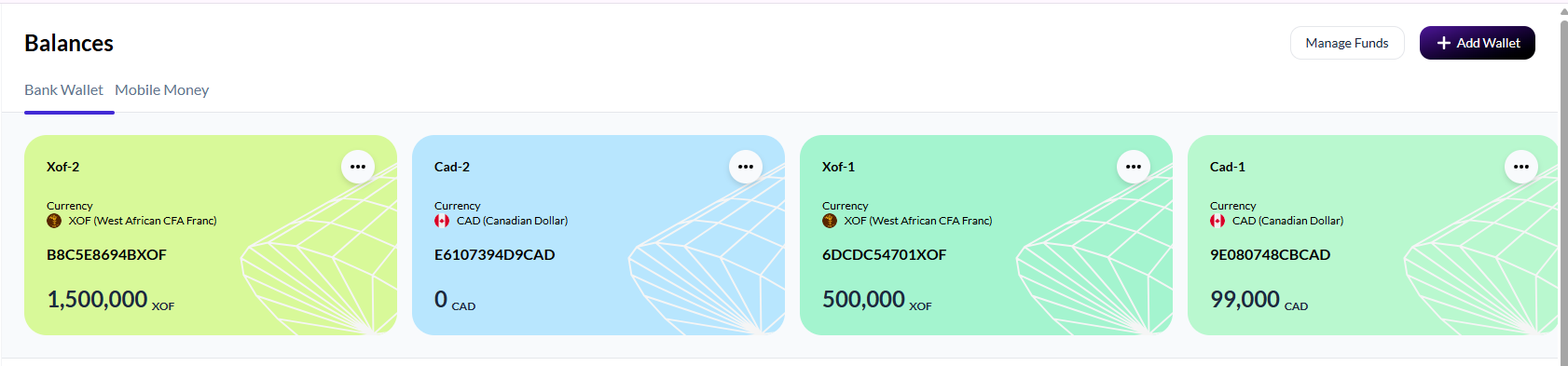
Bank Wallets
Bank wallets hold funds received from or sent to traditional bank accounts.
Characteristics:
- 🏦 Bank-based funds - Connected to traditional banking system
- 💱 Multi-currency support - Create wallets in different currencies (XOF, CAD, etc.)
- 🔄 Payouts and collections - Send and receive funds via bank transfers
- 💰 Higher transaction limits - Suitable for larger business transactions
Use cases:
- International payments
- Large business transactions
- Corporate payroll
- Vendor payments
Mobile Money Wallets
Mobile money wallets hold funds for mobile money transactions (Orange, MTN Mobile Money, etc.).
Characteristics:
- 📱 Mobile money integration - Connected to mobile money providers
- 💱 Multi-currency support - Create wallets for different mobile money currencies
- ⚡ Instant transfers - Fast mobile money transactions
- 👥 Customer payments - Accept payments from mobile money users
Use cases:
- Mobile money collections
- Customer payments in WAEMU/UMOA region
- Micro-transactions
- Agent network payouts
Managing Wallets in the Portal
You can manage both wallet types from the Business Portal:
- Bank Wallets: business.mara.boo/balances/default-wallet
- Mobile Money Wallets: business.mara.boo/balances/mobile-money
Creating a New Wallet
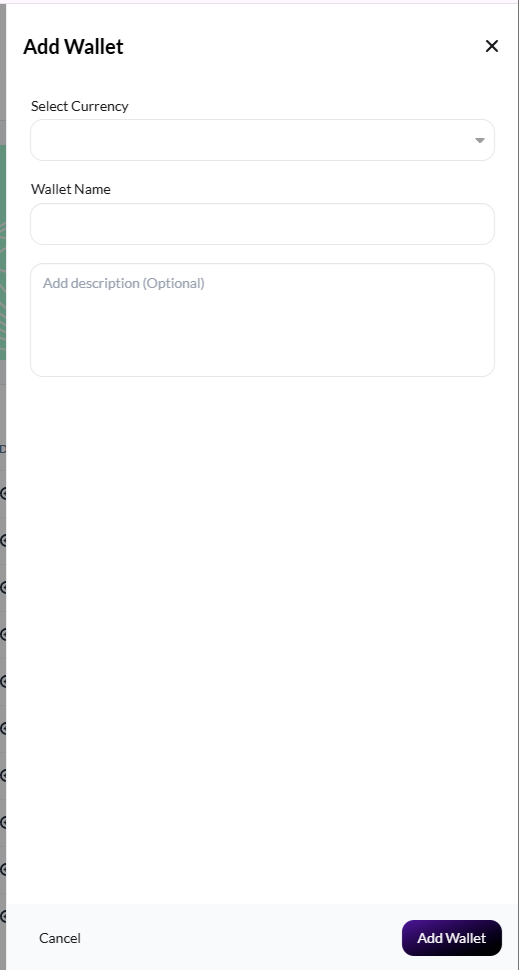
Click "+ Add Wallet" to create a new wallet:
- Select the currency for your wallet
- Enter a descriptive wallet name
- Optionally add a description
- Click "Add Wallet"
Wallet Structure
{
  "id": "b8c5e869-4b10-4419-9657-bdd5d4863336",
  "balance": 1500000,
  "wallet_name": "xof-2",
  "currency": "XOF",
  "description": "2",
  "business_id": "1af71b98-c3a6-4a1c-b62b-66aa69542de0",
  "user_id": "8f4f7a20-87be-4411-b178-a3528a034744",
  "wallet_type": "BankWallet",
  "status": "ACTIVE",
  "created_at": 1760222314.928337,
  "updated_at": 1760222762.347509,
  "wallet_reference": "B8C5E8694BXOF"
}
Wallet Fields
| Field | Type | Description |
|---|---|---|
id | string | Unique UUID identifier for the wallet |
balance | number | Total balance in smallest currency unit (e.g., cents) |
wallet_name | string | Human-readable name for the wallet |
currency | string | Three-letter ISO currency code (e.g., "XOF", "CAD") |
description | string | Optional description for the wallet |
business_id | string | UUID of the business that owns this wallet |
user_id | string | UUID of the user who created the wallet |
wallet_type | string | Type of wallet: "BankWallet" or "MobileMoneyWallet" |
status | string | Wallet status: "ACTIVE", "INACTIVE", or "DISABLED" |
created_at | number | Unix timestamp (with decimals) when wallet was created |
updated_at | number | Unix timestamp (with decimals) when wallet was last updated |
wallet_reference | string | Unique reference code for the wallet (e.g., "B8C5E8694BXOF") |
Wallet Statuses
| Status | Description | Can Transact? |
|---|---|---|
ACTIVE | Wallet is operational and can process transactions | ✅ Yes |
INACTIVE | Wallet is inactive but not permanently disabled | ❌ No |
DISABLED | Wallet is disabled and cannot be used | ❌ No |
Currency Support
Maraboo supports the following currencies for both bank and mobile money wallets:
Supported Currencies:
- 💵 CAD - Canadian Dollar
- 💰 XOF - West African CFA Franc
- 💵 USD - US Dollar (coming soon)
Multi-Currency Wallets
You can create multiple wallets in different currencies. Each wallet holds funds in a single currency and can be managed independently from the Business Portal.
Wallet Operations
Viewing Wallets
Retrieve all wallets associated with your account:
const timestamp = new Date().toISOString();

const response = await fetch('https://gateway.mara.boo/api/v1/purses/wallets', {
  headers: {
    'Authorization': `HMAC-SHA256 ${process.env.MARABOO_PUBLIC_KEY}:${process.env.MARABOO_PRIVATE_KEY}`,
    'X-Origin': 'third-party-api.mara.boo',
    'X-Timestamp': timestamp,
    'Content-Type': 'application/json'
  }
});

const wallets = await response.json();
console.log('Wallets:', wallets);import os
import requests
from datetime import datetime, timezone
timestamp = datetime.now(timezone.utc).isoformat();
response = requests.get(
'https://gateway.mara.boo/api/v1/purses/wallets',
headers={
'Authorization': f'HMAC-SHA256 {os.getenv("MARABOO_PUBLIC_KEY")}:{os.getenv("MARABOO_PRIVATE_KEY")}',
'X-Origin': 'third-party-api.mara.boo',
'X-Timestamp': timestamp,
'Content-Type': 'application/json'
}
)
wallets = response.json()
print('Wallets:', wallets)import java.net.http.*;
import java.time.Instant;
String timestamp = Instant.now().toString();
String publicKey = System.getenv("MARABOO_PUBLIC_KEY");
String privateKey = System.getenv("MARABOO_PRIVATE_KEY");
HttpRequest request = HttpRequest.newBuilder()
.uri(URI.create("https://gateway.mara.boo/api/v1/purses/wallets"))
.header("Authorization", "HMAC-SHA256 " + publicKey + ":" + privateKey)
.header("X-Origin", "third-party-api.mara.boo")
.header("X-Timestamp", timestamp)
.header("Content-Type", "application/json")
.GET()
.build();
HttpResponse<String> response = HttpClient.newHttpClient()
.send(request, HttpResponse.BodyHandlers.ofString());
System.out.println("Wallets: " + response.body());using System;
using System.Net.Http;
using System.Threading.Tasks;
var timestamp = DateTime.UtcNow.ToString("o");
var publicKey = Environment.GetEnvironmentVariable("MARABOO_PUBLIC_KEY");
var privateKey = Environment.GetEnvironmentVariable("MARABOO_PRIVATE_KEY");
var client = new HttpClient();
var request = new HttpRequestMessage(HttpMethod.Get, "https://gateway.mara.boo/api/v1/purses/wallets");
request.Headers.Add("Authorization", $"HMAC-SHA256 {publicKey}:{privateKey}");
request.Headers.Add("X-Origin", "third-party-api.mara.boo");
request.Headers.Add("X-Timestamp", timestamp);
request.Headers.Add("Content-Type", "application/json");
var response = await client.SendAsync(request);
var wallets = await response.Content.ReadAsStringAsync();
Console.WriteLine($"Wallets: {wallets}");package main
import (
"fmt"
"net/http"
"os"
"time"
)
func main() {
timestamp := time.Now().UTC().Format(time.RFC3339)
publicKey := os.Getenv("MARABOO_PUBLIC_KEY")
privateKey := os.Getenv("MARABOO_PRIVATE_KEY")
req, _ := http.NewRequest("GET", "https://gateway.mara.boo/api/v1/purses/wallets", nil)
req.Header.Set("Authorization", fmt.Sprintf("HMAC-SHA256 %s:%s", publicKey, privateKey))
req.Header.Set("X-Origin", "third-party-api.mara.boo")
req.Header.Set("X-Timestamp", timestamp)
req.Header.Set("Content-Type", "application/json")
client := &http.Client{}
resp, _ := client.Do(req)
defer resp.Body.Close()
fmt.Println("Wallets response:", resp)
}TIMESTAMP=$(date -u +"%Y-%m-%dT%H:%M:%S.%3NZ")
curl -X GET "https://gateway.mara.boo/api/v1/purses/wallets" \
-H "Authorization: HMAC-SHA256 ${MARABOO_PUBLIC_KEY}:${MARABOO_PRIVATE_KEY}" \
-H "X-Origin: third-party-api.mara.boo" \
-H "X-Timestamp: ${TIMESTAMP}" \
-H "Content-Type: application/json"Creating Wallets
Wallets are created through the Business Portal using the "Add Wallet" button. Select your currency, provide a wallet name, and optionally add a description.
TIP
Wallets cannot currently be created via API. Use the Business Portal to create new bank wallets or mobile money wallets.
Wallet Balance
The wallet balance is included in the wallet response when you retrieve wallets. The balance field shows the total balance in the smallest currency unit (e.g., cents for CAD/USD, centimes for XOF).
Wallet Webhooks
Stay informed about wallet changes via webhooks:
Wallet Events:
wallet.created- New wallet createdwallet.updated- Wallet information or balance updated
See the Webhooks documentation for implementation details.
Example Wallet Events
{
  "event_type": "wallet.created",
  "id": "b8c5e869-4b10-4419-9657-bdd5d4863336",
  "balance": 0,
  "wallet_name": "xof-2",
  "currency": "XOF",
  "description": "2",
  "business_id": "1af71b98-c3a6-4a1c-b62b-66aa69542de0",
  "user_id": "8f4f7a20-87be-4411-b178-a3528a034744",
  "wallet_type": "BankWallet",
  "status": "ACTIVE",
  "created_at": 1760222314.928337,
  "updated_at": 1760222314.928337,
  "wallet_reference": "B8C5E8694BXOF"
}{
"event_type": "wallet.updated",
"id": "b8c5e869-4b10-4419-9657-bdd5d4863336",
"balance": 1500000,
"wallet_name": "xof-2",
"currency": "XOF",
"description": "2",
"business_id": "1af71b98-c3a6-4a1c-b62b-66aa69542de0",
"user_id": "8f4f7a20-87be-4411-b178-a3528a034744",
"wallet_type": "BankWallet",
"status": "ACTIVE",
"created_at": 1760222314.928337,
"updated_at": 1760222762.347509,
"wallet_reference": "B8C5E8694BXOF"
}TIP
The wallet webhook payload contains the complete wallet object, matching the structure returned by the wallet API endpoints.
Best Practices
1. Monitor Wallet Balances
Set up alerts for low balance conditions:
async function checkWalletBalance(walletId, threshold) {
  const wallet = await getWallet(walletId);

  if (wallet.availableBalance < threshold) {
    await sendAlert({
      message: `Low balance alert: ${wallet.walletName}`,
      balance: wallet.availableBalance,
      threshold: threshold
    });
  }
}
2. Handle Insufficient Funds
Always check wallet balance before initiating transactions:
async function initiatePayment(walletId, amount) {
  const wallet = await getWallet(walletId);

  if (wallet.balance < amount) {
    throw new Error('Insufficient funds');
  }

  // Proceed with payment
  return await createPayment({ walletId, amount });
}
3. Separate Wallets by Purpose
Organize your funds using multiple wallets:
const wallets = {
  operating: 'wallet_operating_123',  // Day-to-day operations
  payroll: 'wallet_payroll_456',      // Employee payments
  settlement: 'wallet_settlement_789', // Customer settlements
  reserve: 'wallet_reserve_abc'        // Emergency reserve
};
Troubleshooting
Wallet Not Found
Problem: API returns 404 for wallet ID
Possible causes:
- ❌ Incorrect wallet ID
- ❌ Wallet belongs to different account
Solution:
- Verify wallet ID is correct
- Ensure you're using the right API keys
- Check wallet exists via portal
Balance Mismatch
Problem: Wallet balance doesn't match expected value
Possible causes:
- ⏳ Recent transaction not yet reflected
- 🔄 Webhook not processed
- 📊 Balance update delay
Solution:
- Review recent transactions
- Wait for webhook notifications
- Check wallet via portal
- Contact support if discrepancy persists
Insufficient Funds
Problem: Transaction fails with insufficient funds error
Possible causes:
- 💰 Wallet balance too low
- ❌ Currency mismatch
- 🔒 Wallet status is not ACTIVE
Solution:
- Check the
balancefield in the wallet response - Ensure transaction currency matches wallet currency
- Verify wallet status is ACTIVE
Next Steps
Learn more about wallet operations:
Wallet Operations - Manage wallet operations
Transactions - Process payments and currency changes
Webhooks - Monitor wallet events
Information Needed
Please provide the following details to complete this page:
- Wallet types (main wallet, sub-wallets, etc.)
- Complete list of supported currencies
- Wallet statuses and their meanings
- Can wallets be created via API?
- Endpoint for getting specific wallet balance
- Wallet creation endpoint and payload structure (if supported)